System requirements
- macOS 11 (Big Sur) or later. The bundled image processing engine is a native universal
binary, signed and notarised by Apple, and cannot run on earlier systems.
If you are still on macOS 10.14 or 10.15, stay with version 5.10.
- 64-bit Windows. The bundled ExifTool is 64-bit only. Lightroom Classic has itself been
64-bit only for years, so this should affect nobody.
Step 1: Installing ImageMagick (Windows users only)
(Mac users do not need do this since the plugin includes its own version)
To use this plugin, Windows users must install Version 7 of ImageMagick. Mac users do not need do this
since the plugin includes its own version.
If you have any problems with the plugin, you'll may also need to install this Microsoft pacakge:
Step 2: Installing LR/Mogrify 2
Download and unzip LR/Mogrify 2. You should now have a plugin called 'LR2Mogrify.lrplugin'.
You need to use Lightroom's plugin manager to tell Lightroom where to find your plugin:
- Move LR2Mogrify.lrplugin to a convenient location of your own choosing.
- Open Lightroom's plugin manager from the File menu.
- Click the "Add" button.
- Browse to the plugin and click "OK" on a Mac or "Add plugin" on a PC.
Step 3: Unlock the trial version
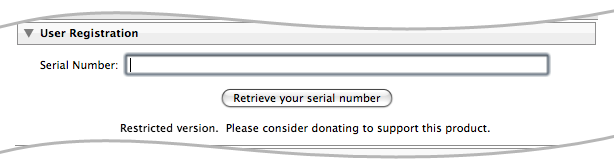
If you have donated towards the project you should unlock the trial version using the registration code
that you should have received.
- Open the plugin manager from the File menu.
- Choose "LR/Mogrify 2" from the list of plugins.
- Enter your registation code into the User Registration section
Step 4: Set up (Windows users only)
Windows users now need to tell the plugin where to find ImageMagick's magick application.
- Go to Lightroom's Library module, click on any image and then press the Export button.
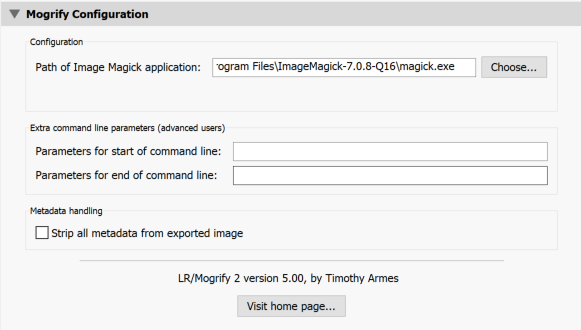
- On the left side of the export dialog box, under 'Post Process Actions' double click on 'Mogrify Configuration'.
- In the Mogrify Configuration panel which is now showing on the right, press 'Choose', browse to
the ImageMagick installation (e.g. C:\Program Files\ImageMagick-7.0.8-Q16 - this will vary with the version of ImageMagick)
and choose magick.exe
|
|